Skip to content
WiFi Tracer

WiFi Tracer · for iPhone

See what your networkis really doing.

WiFi Tracer puts 26 network tools on your iPhone. Check your Wi‑Fi link quality, find every device on your network, audit its security and test any host. Every measurement runs on your device.

Download on theApp Store Free download · iOS 17+ · Ad‑free and private
  • Speed test
  • Why is it slow?
  • LAN scan
  • Security audit
  • Hidden cameras
  • Traceroute
  • DNS benchmark
  • Region map
  • +18 more
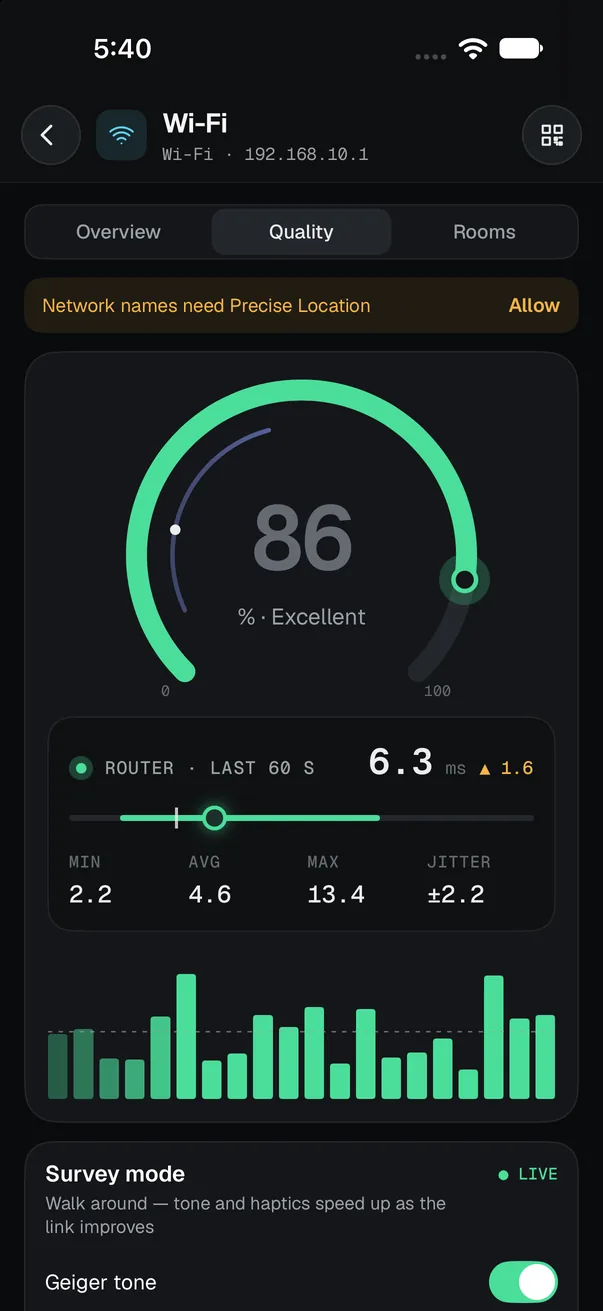
Wi-Fi link quality gauge at 86% excellent, with router round-trip min 2.2 ms, average 4.6 ms and jitter 2.2 ms
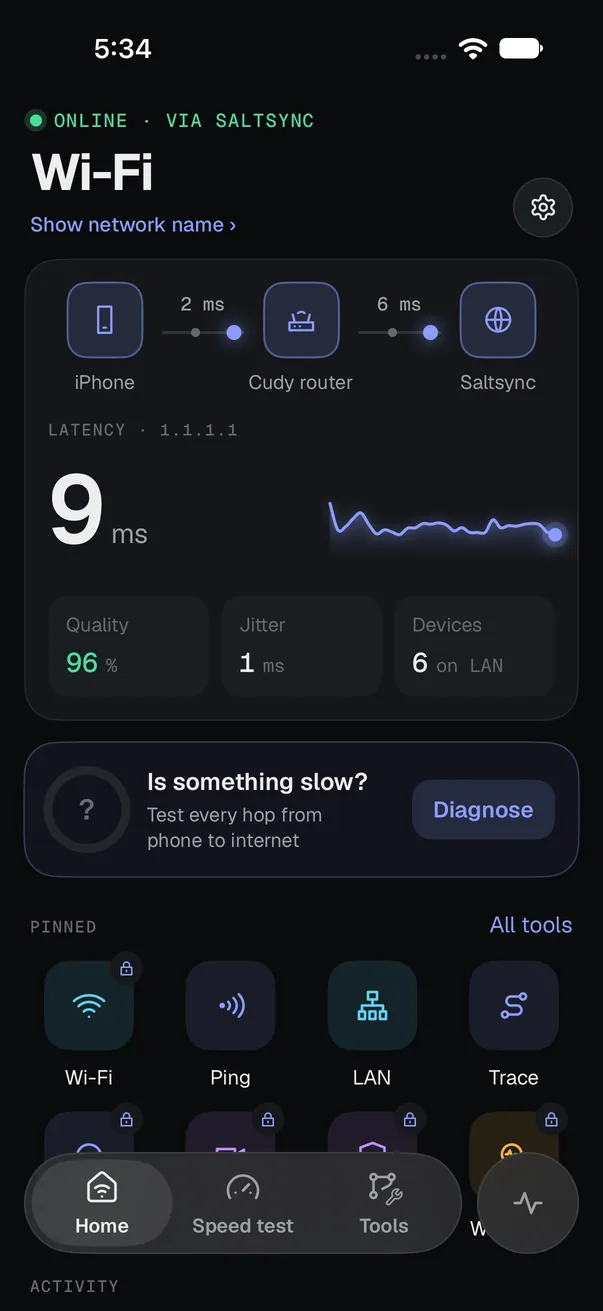
WiFi Tracer home screen: iPhone to router to internet path, 9 ms latency, 96% link quality, 6 devices on the LAN and pinned tools
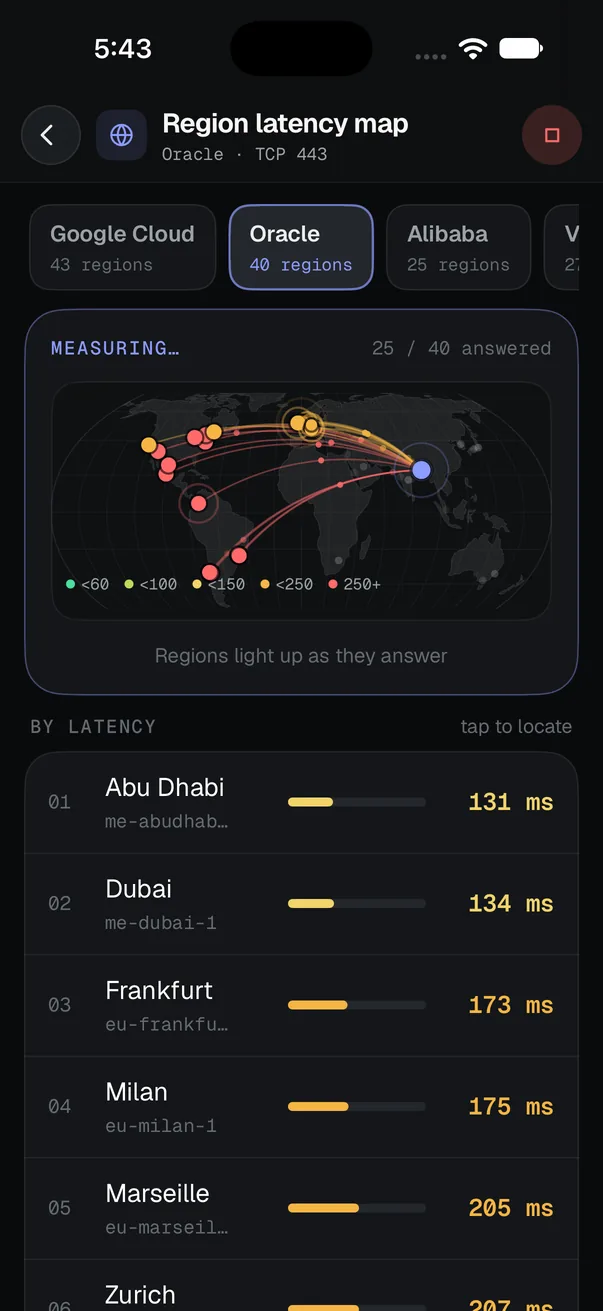
Region latency map lighting up 40 Oracle Cloud regions on a world map, Abu Dhabi fastest at 131 ms

Measure

Speed, loaded latency, jitter, MTU, bufferbloat and call quality.

Local

Your Wi‑Fi link quality and every device on your LAN.

Inspect

TLS, DNS, headers, WHOIS and ports for any host.

Diagnose

Six checks, one plain‑English verdict, and a security audit.

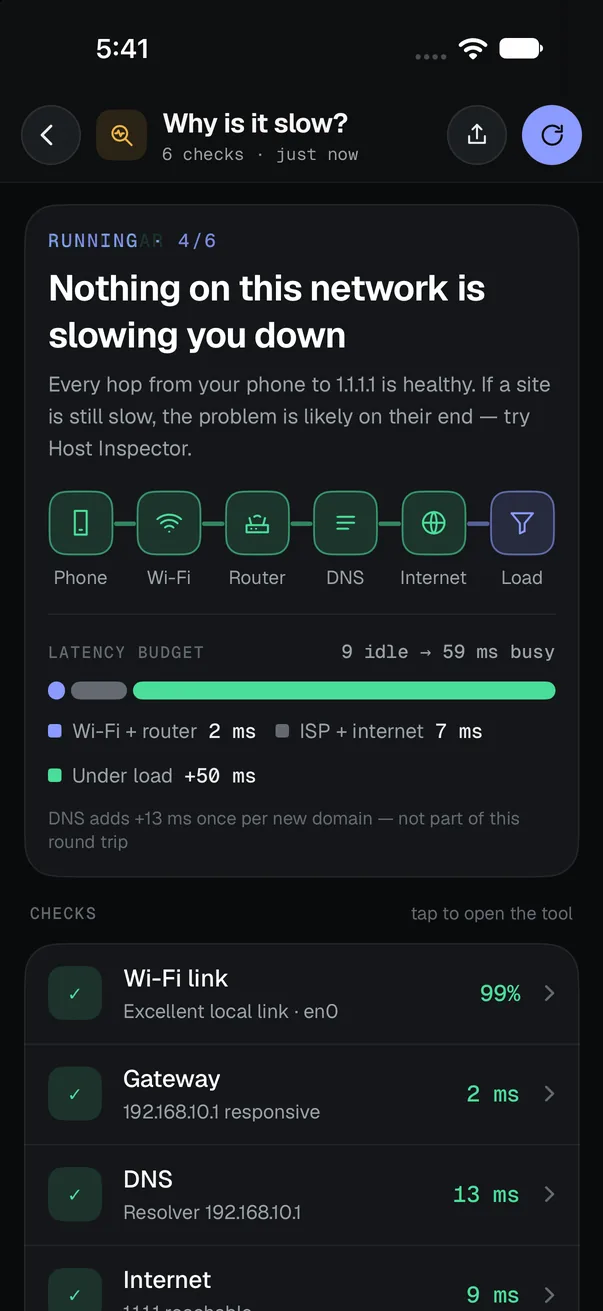
“Why is it slow?” result: nothing on this network is slowing you down. Wi-Fi link 99%, gateway 2 ms, DNS 13 ms, internet 9 ms, latency budget 9 ms idle and 59 ms busy

Why is it slow?

Ask why it’s slow.Get an answer.

One tap checks every hop from your phone to the internet at once. If your router is the weak link, it won’t blame your provider: you get the one link that failed and what to try next.

  1. Wi‑Fi link · round‑trip time, jitter and loss to the router

  2. Gateway · is the router responding, and how fast

  3. DNS · lookup time and failures on your resolver

  4. Internet · packet loss and latency to the edge

  5. Bufferbloat · how much latency grows under load

  6. IPv6 · whether your ISP gives you a working IPv6 path

Speed test

Speed is onlyhalf the story.

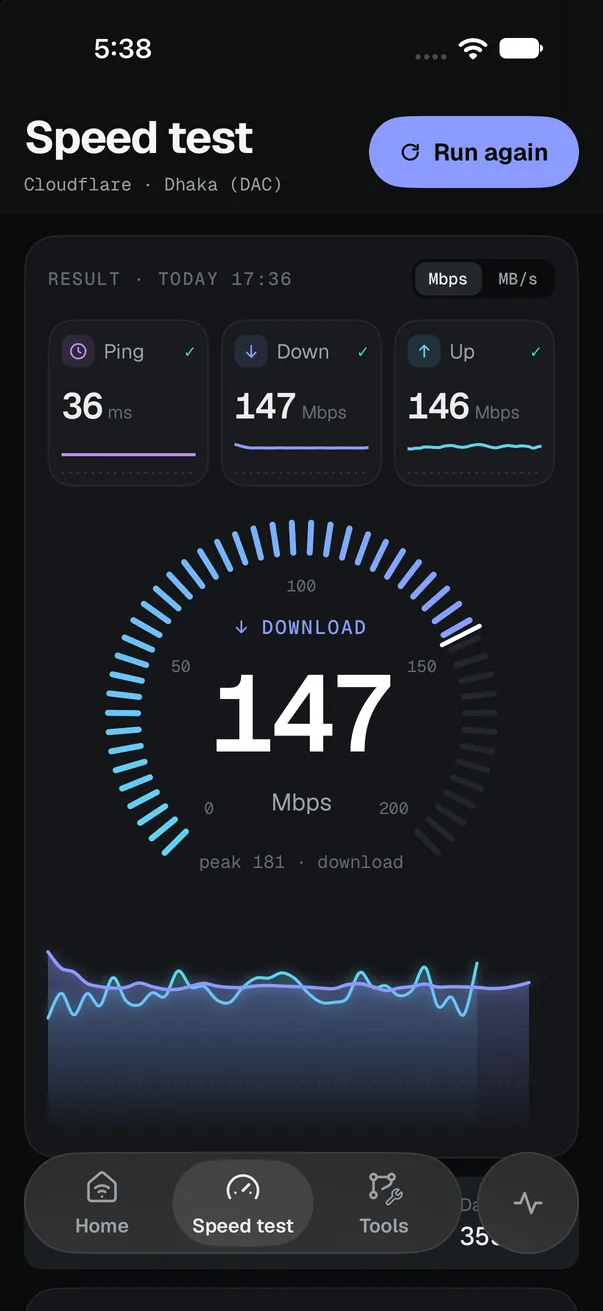
Download and upload from Cloudflare and regional servers, plus the idle and loaded latency you feel on calls and games. Every result says what your line can handle, from 4K streaming to cloud backup, and lands in your history.

  • Loaded latency
  • Jitter
  • Multi‑server
  • History
Speed test result with 36 ms ping, 147 Mbps download, 146 Mbps upload and a live throughput graph

Local network

See every deviceon your Wi‑Fi.

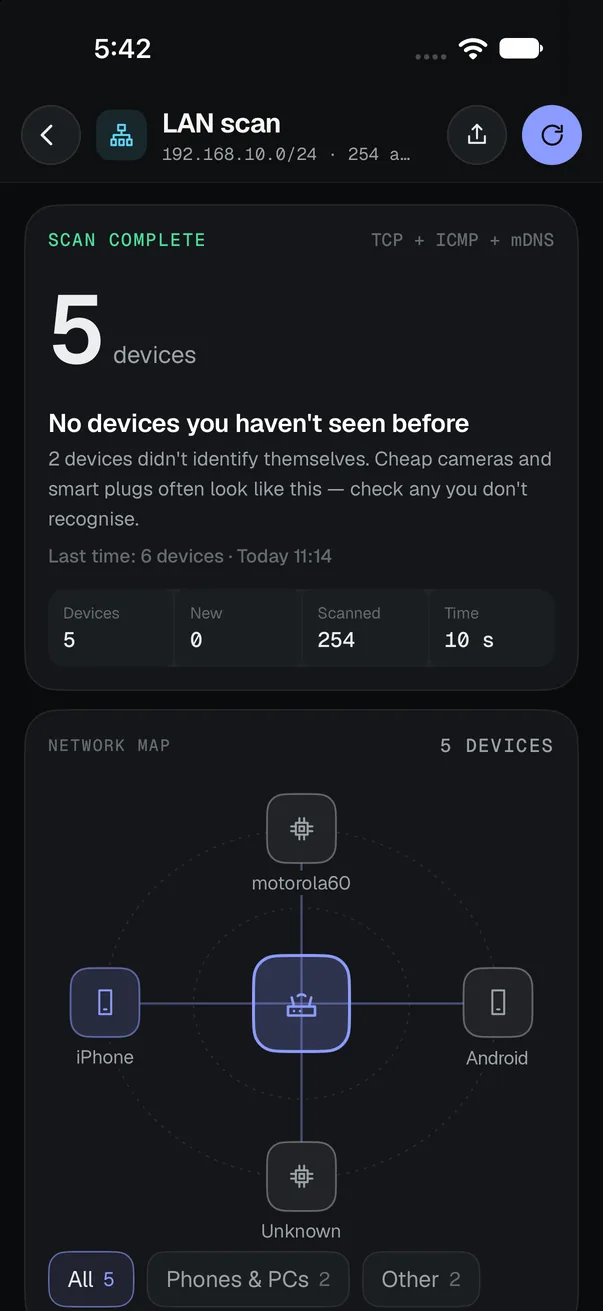
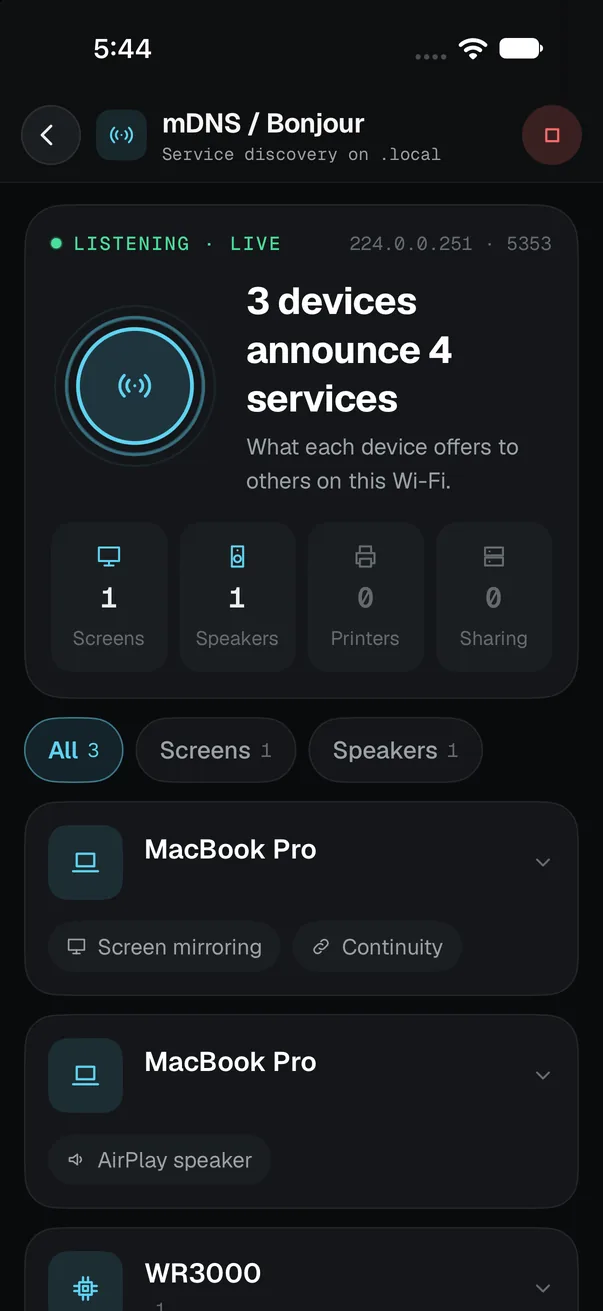
LAN scan sweeps your subnet with TCP, ICMP and mDNS, draws a map of what answered and flags devices you haven’t seen before. Bonjour shows what each one offers, from AirPlay speakers to screen mirroring.

  • Network map
  • New‑device alerts
  • Bonjour
  • UPnP
LAN scan complete: 5 devices on 192.168.10.0/24, none new, drawn on a network map around the router
mDNS and Bonjour browser: 3 devices announce 4 services, including screen mirroring and an AirPlay speaker

Security

Is this networksafe to use?

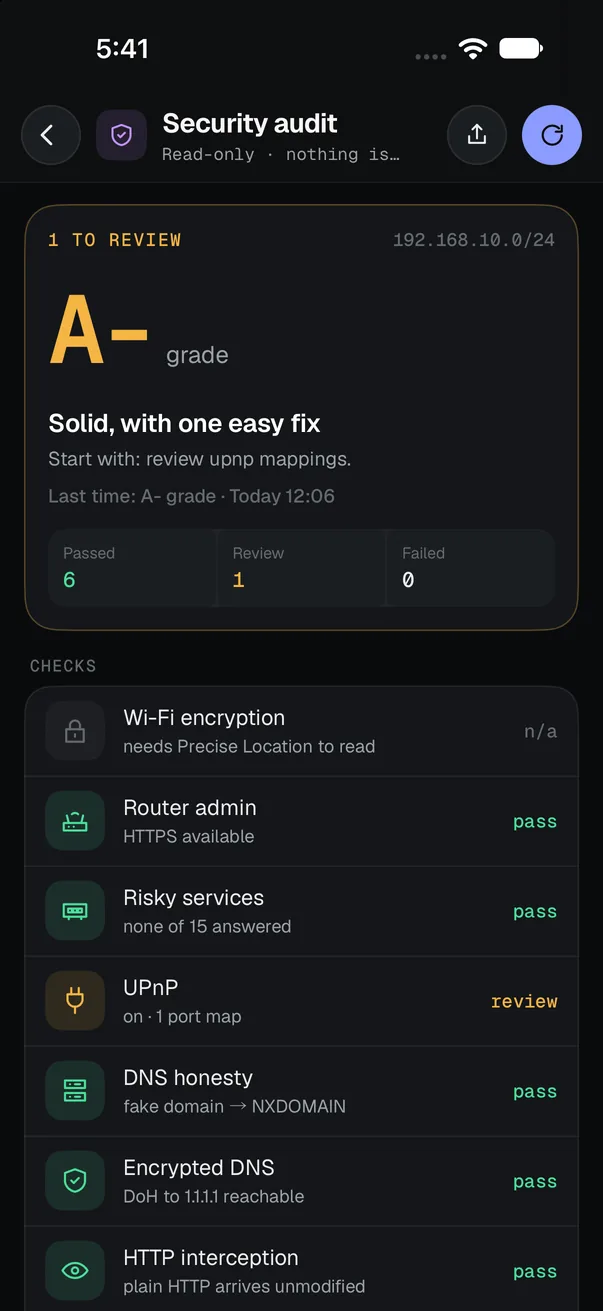
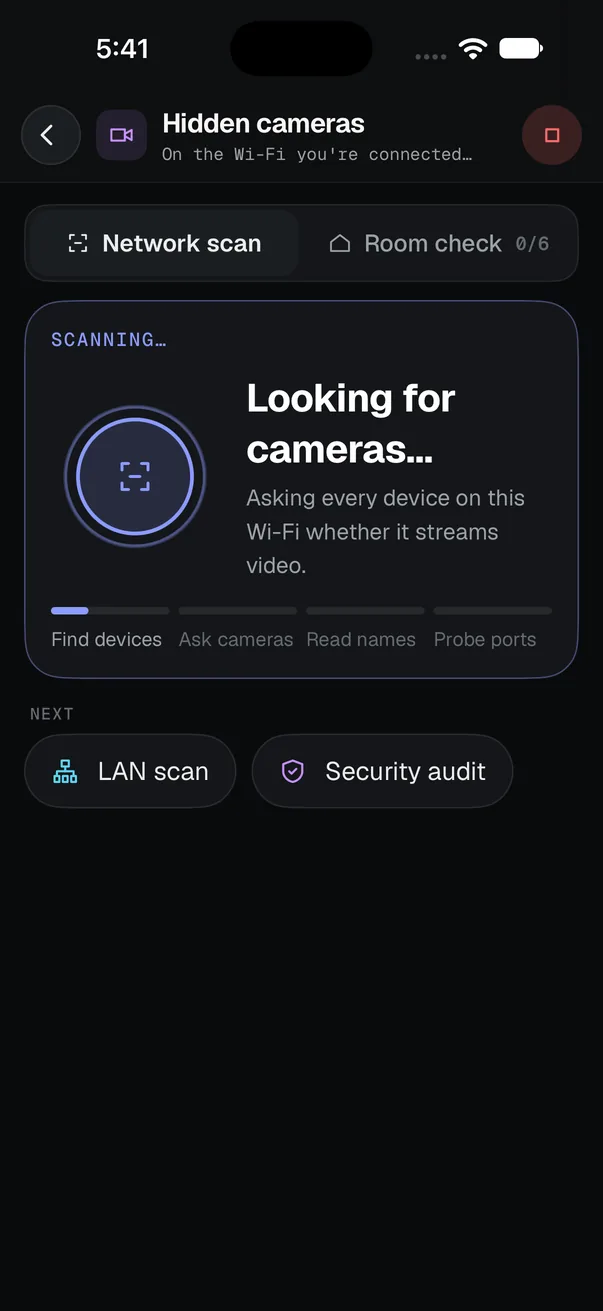
The security audit grades your network from A to F: router admin over HTTPS, risky open services, UPnP port maps, DNS honesty, encrypted DNS and HTTP interception. On hotel or Airbnb Wi‑Fi, Hidden cameras asks every device whether it streams video.

  • A–F grade
  • UPnP
  • DNS hijack
  • Hidden cameras
Security audit graded A-: 6 checks passed, 1 to review (UPnP has one port map)
Hidden cameras scan asking every device on the Wi-Fi whether it streams video

Host inspector

One domain.Ten checks.

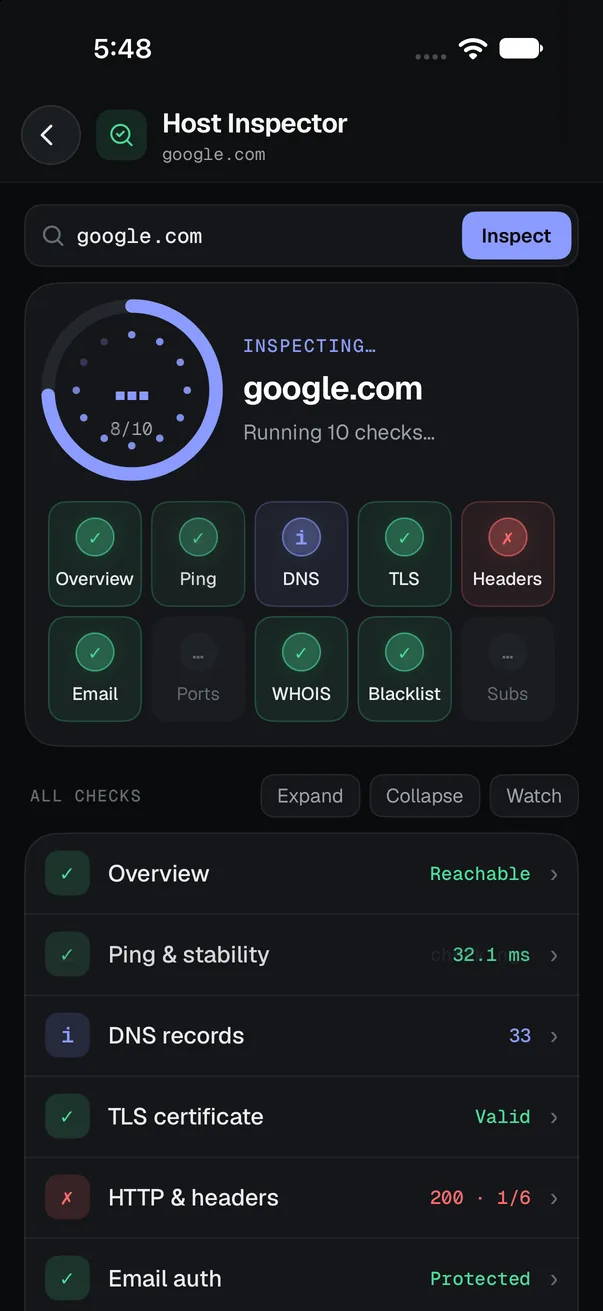
Type a domain or IP and get one graded report: reachability, ping stability, DNS records (A, AAAA, MX, NS, TXT, CAA), the TLS certificate, HTTP security headers, email authentication (SPF, DKIM, DMARC), common open ports, WHOIS expiry and blocklist status.

  • TLS
  • DNS
  • Headers
  • Email auth
  • WHOIS
  • Ports
Host Inspector checking google.com: DNS records, TLS certificate, HTTP headers, email auth, WHOIS and ports

Calls & games

Know beforeyou join the call.

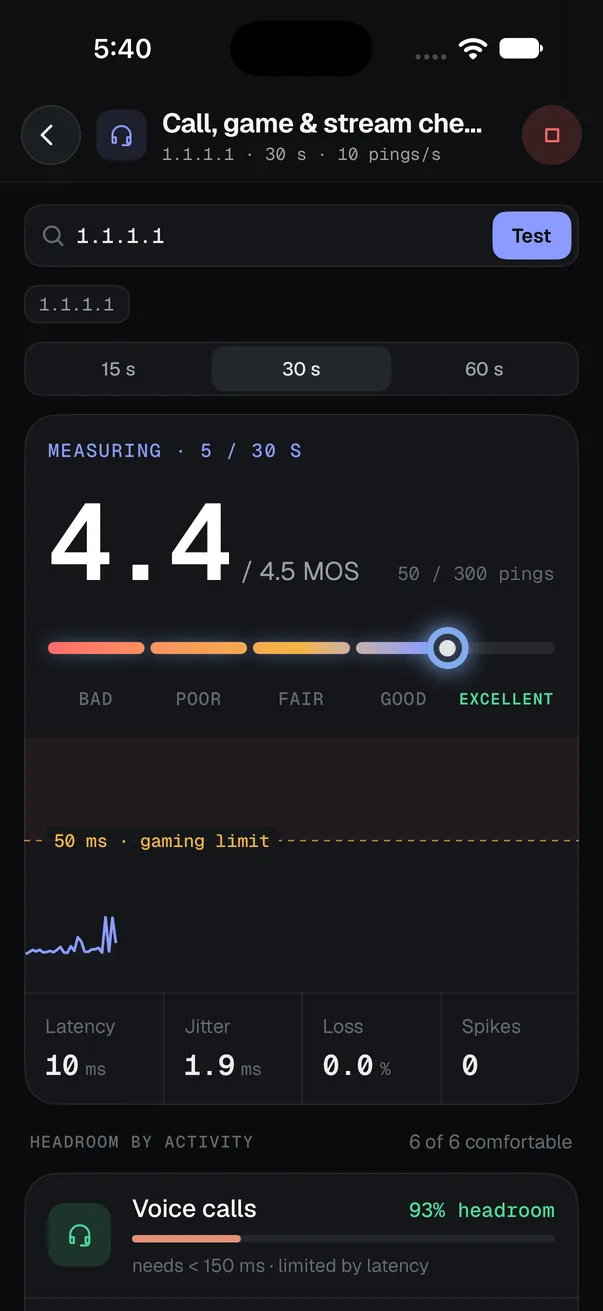
Ten pings a second for up to a minute, scored as a call‑quality MOS out of 4.5. Latency, jitter, loss and spikes are drawn against the gaming limit, and six activities get their own headroom: voice and video calls, competitive, cloud and casual gaming, and streaming.

  • MOS score
  • Jitter
  • Spikes
  • Headroom
Call, game and stream check: 4.4 out of 4.5 MOS, excellent, with 10 ms latency, 1.9 ms jitter, no loss and 93% headroom for voice calls

27 tools

One toolkit.Every layer.

Free always free. Every other tool runs once free, then with Pro.

Measure

08

How fast, how stable

  • SPSpeed testMulti‑server · loaded latency · CSVFree
  • PGPingLive · monitor · compare hostsFree
  • TRTraceroutePer‑hop RTT · ASN owner
  • BBBufferbloatLatency under load · A–F grade
  • MTUMTU probePath MTU · MSS
  • CQCall, game & stream checkJitter · loss · MOS score
  • RGRegion latency mapCloud regions worldwide
  • DBDNS benchmarkCompare resolvers · fastest

Local network

05

What’s on your Wi‑Fi

  • WFWi‑Fi analyzerNetwork · link quality · survey
  • LNLAN scanDevices on your subnet
  • MDmDNS / BonjourServices on .local
  • UPUPnP browserSSDP discovery
  • QRWi‑Fi QR shareJoin code for guestsFree

Inspect

06

Any host, any domain

  • HIHost InspectorTLS · DNS · headers · WHOIS · ports
  • DNSDNS lookupAll record types · DoHFree
  • WHWHOIS & RDAPRegistrar · dates · status
  • GEOIP geolocationCity · ASN · map
  • PSPort scannerProfiles · custom ranges
  • SNSubnet calculatorCIDR · masks · rangesFree

Diagnose

05

Find the bottleneck

  • WSWhy is it slow?6 checks in parallel
  • NRNetwork reportConnection · devices · security · speed
  • V6IPv6 readinessDual‑stack · CDN reach
  • CPCaptive portalHotspot login detectionFree
  • IRISP evidence reportPDF of speeds and outages

Security

03

Is it safe to use

  • SASecurity auditEncryption · UPnP · router · DNS
  • CAMHidden camerasONVIF · camera ports
  • VLVPN & DNS leak testVPN · resolver · IPv6

Honest by design

What an iPhone appcan and can’t see.

iOS restricts what App Store apps can read about Wi‑Fi. WiFi Tracer works within those limits and tells you when something isn’t available, instead of showing made‑up numbers.

Wi-Fi data available to iPhone apps on iOS 17 and later
DataAvailable on iPhone?What WiFi Tracer does
Wi‑Fi signal strength (RSSI, dBm)NoScores link quality from round‑trip time, jitter and loss to the router, sampled every second
Wi‑Fi channel and congestionNoExplains the limit and links to your router’s admin page
Nearby networksNoNot shown
Device MAC addressesNoIdentifies devices from open ports, Bonjour names and reverse DNS
Network name (SSID) and BSSIDYes, with Precise LocationShown on the Wi‑Fi screen. Location itself is never stored
Devices and services on your LANYes, with Local Network accessLAN scan, Bonjour, UPnP, security audit, hidden cameras
Latency, jitter, packet loss, throughputYesSpeed test, ping, traceroute, bufferbloat, call readiness

Privacy

Your network stays yours.

Ad‑free on every plan. The result is the whole screen.

Stays on your iPhone. Scans, history and device names never leave it. The app has no analytics, account or server of its own. Read the privacy policy →

Free to start. Speed test, ping, DNS lookup, subnet calculator, Wi‑Fi QR share and captive portal check are always free. Every other tool gets one free run. Pro unlocks everything for $14.99 once or $1.99 a month.

FAQ

Questions, answered.

What is WiFi Tracer?

WiFi Tracer is an iPhone app that bundles 26 network tools, including a speed test, ping, traceroute, LAN scan, host inspector and security audit. It runs every measurement on the device and needs no account. It has no ads or tracking. It is available in English, 简体中文, Español, Português and Français.

Why is my Wi-Fi slow?

A slow connection usually comes from one of six places: a weak Wi‑Fi link, an overloaded router, slow DNS, packet loss at your internet provider, bufferbloat (latency that spikes under load), or the website itself. WiFi Tracer’s “Why is it slow?” tool tests each hop in order and tells you which one is failing.

Can an iPhone app show Wi-Fi signal strength or channels?

No. iOS does not let App Store apps read Wi‑Fi signal strength (RSSI), channels, nearby networks or device MAC addresses. Apps that claim to show these on iPhone are estimating. WiFi Tracer instead scores link quality from round‑trip time, jitter and packet loss to your router, measured every second. See the full table.

How do I find hidden cameras on hotel or Airbnb Wi-Fi?

Join the rental’s Wi‑Fi, then run the Hidden cameras tool. It scans the subnet for devices with camera ports (RTSP 554, 8554 and common vendor ports), asks ONVIF cameras to identify themselves, reads UPnP descriptions and flags device names from camera brands. It can only see cameras on the same network as your phone, so a camera on a separate network or recording to an SD card won’t appear.

Is WiFi Tracer free?

It’s free to download. Speed test, ping, DNS lookup, subnet calculator, Wi‑Fi QR share and captive portal check are always free, and every other tool gets one free run. WiFi Tracer Pro unlocks all 26 tools, monitors, new‑device alerts and CSV export for a one‑time $14.99 or $1.99 a month (US prices). There are no ads on either plan.

Does WiFi Tracer collect my data?

No. Scans, history and device names stay on your iPhone. The app has no analytics, no account and no server of its own. Some tools contact public services to do their job, such as Cloudflare for the speed test or ipify for your public IP. The privacy policy lists every one.

Why does it ask for Location and Local Network access?

iOS only shares the Wi‑Fi network name (SSID) with apps that have Precise Location, so WiFi Tracer asks for it to show which network you are on. It never stores or sends your location. Local Network access lets the LAN scan, Bonjour, UPnP, security audit and hidden camera tools find devices on your network. Both are optional: every other tool works without them.

What is bufferbloat?

Bufferbloat is extra latency caused by oversized buffers in your router or modem when the line is busy. Your speed test may look fine while video calls and games stutter during uploads or downloads. WiFi Tracer measures latency before and during load and grades the difference from A to F.

WiFi Tracer app icon

Stop guessing.Start measuring.

Download on theApp Store Utilities · Developer Tools · 4+ · Free download